Playbooks
Playbooks are reusable, step-by-step instructions that guide the AIVA AI assistant through standardized analysis workflows. Instead of typing the same sequence of prompts for every sample, you can create or select a playbook that automates the process, ensuring consistency and saving time.
Key features:
- Marketplace: browse community-contributed playbooks for common analysis scenarios
- Custom creation: write your own playbooks with step-by-step instructions
- Forking: copy and modify existing playbooks to suit your needs
- Sharing: publish playbooks publicly or share within your team
Playbooks tabs
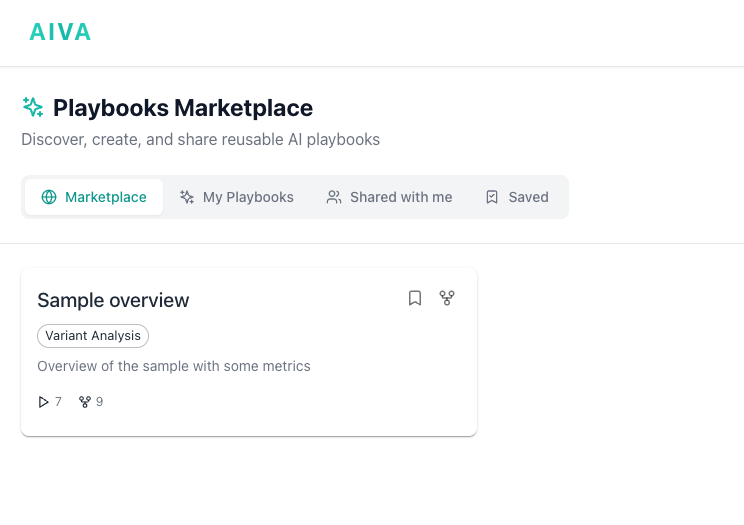
The Playbooks section is organized into four tabs:
| Tab | Description |
|---|---|
| Marketplace | Browse community-contributed playbooks across categories. |
| My Playbooks | Playbooks you have created or forked. |
| Shared with me | Playbooks shared directly with you by other users. |
| Saved | Playbooks you have bookmarked for quick access. |
Using a playbook
- Navigate to the Playbooks section from the main navigation.
- Browse the marketplace by category (Clinical Variant Interpretation, Rare Disease, Pharmacogenomics, Cancer Genomics, Research, Quality Control) or search by keyword.
- Click a playbook to preview its steps, tools used, and author details.
- Click Fork if you want to save/modify the playbook before using it.
- Go to the Chat section and select the sample and playbook you want to analyze. Just type
@samples:sample1 @playbook:rare_disease_analysisand hit enter.
Customizing on the fly
You can intervene at any point during playbook execution. Add follow-up questions, skip steps, or ask AIVA to go deeper on a particular finding.
Creating a playbook
- Navigate to Playbooks and click New Playbook.
- Enter a title and description.
- Add steps, each with a title and instruction written as you would a prompt in AIVA Chat.
- Optionally specify an expected tool and output format (table, list, summary) for each step.
- Save for yourself or publish it to the marketplace.
Writing effective steps
Be specific ("List all missense variants with CADD > 20 and gnomAD AF < 0.001") rather than vague ("Find important variants"). Reference previous steps to chain analyses, and keep each step focused on one task.
Forking a playbook
If a marketplace playbook is close to what you need but requires modifications:
- Click Fork on the playbook detail page.
- A copy is created in your personal library.
- Edit the steps as needed and save.
The fork retains a link to the original. You can Unpublish a marketplace playbook at any time. Existing forks by other users are not affected.