Model Selection
AIVA offers a choice of language models to power the AI assistant. Different models provide different tradeoffs between response speed, reasoning depth, and usage cost. You can switch models at any time based on the requirements of your current task.
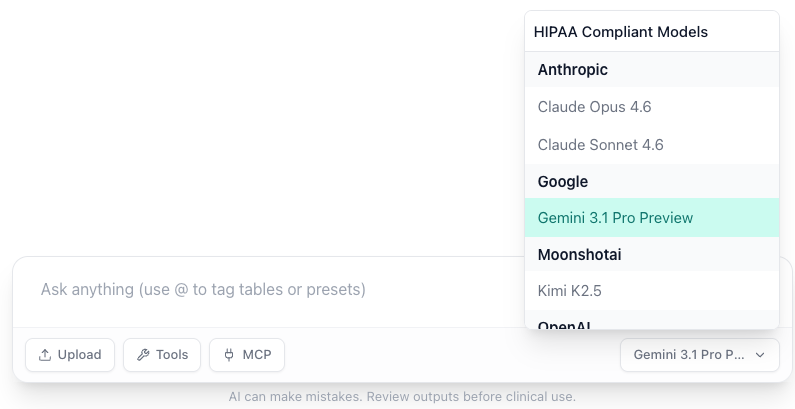
Choosing a Model
To change the active model:
- Open the AIVA Chat interface.
- Locate the model selector in the chat input area.
- Select your preferred model from the dropdown.
- The new model takes effect for your next message.
Per-conversation setting
Model selection applies to the current conversation. You can use different models in different conversations based on the complexity of each task.
When to Use Each
Use Faster Models When
- Asking simple, factual questions about your data.
- Running routine queries like variant counts or gene lists.
- Performing quick lookups (e.g., single variant annotation).
- You need rapid iteration and do not require deep reasoning.
Use More Capable Models When
- Performing complex variant interpretation requiring multiple tools.
- Asking compound questions that involve data queries, literature search, and analysis.
- Working through multi-step diagnostic workflows.
- Needing detailed explanations with clinical context.
- Orchestrating workflows that chain several tools together.
Model updates
The set of available models may change as new models are released and older models are retired. Check the model selector for the current list of available options.
Tips
- Start with a faster model for exploratory questions, then switch to a more capable model when you need deeper analysis.
- Model selection does not affect tool access: all models can use the same set of enabled tools. The difference is in how effectively the model selects and orchestrates those tools.
- Conversation history is preserved when you switch models. Previous messages remain unchanged; only new messages use the selected model.